Woll2Woll’s ActionManager
April 12th, 2005 - Woll2Woll is
pleased to announce its new product, ActionManager
for Visual Studio (VS.NET) and Delphi 2005. See http://www.woll2woll.com
The ActionManager
component is used as a repository of actions that can be applied to components
and controls, such as menus, buttons, check boxes, and radio buttons. Most
controls, where custom behavior is required after the end-user clicks on them,
will benefit from the ActionManager.
Woll2Woll’s design does not replace your
controls, but enhances them with a new Action property. Even 3rd party controls can use
actions defined by the ActionManager. You can also
build your own custom re-usable actions.
Those familiar with earlier VCL development
with Delphi might be familiar with some of the benefits of using actions.
However when building .NET WinForms, actions are not
available in Delphi 2005 nor are they as flexible as Woll2Woll’s
implementation.
Why use actions
- Separate your business logic from the
user-interface controls:
Use of the ActionManager will separate your
business and application logic from your user-interface controls. The
implementation code is associated with an item in a repository, and not a
user-interface control. This makes your code easily shareable by other
controls.
- Centralized code for refreshing the
control's appearance.
The ActionManager gives you a simple methodology
for updating the appearance of your controls based on dynamic criteria. Thus
if one user should have certain buttons or menu items disabled and another
should have them enabled, you can easily handle this logic completely
within the action. You do not need to manipulate the properties of the
user-interface components (buttons, menus, etc.).
- Code re-use: The ActionManager
strongly encourages and allows for code re-use through its architecture of
supporting user-defined standard actions. Quite often you will notice that
you are attaching similar code to many of your visual controls. By
recognizing what is common, you can create your own new defined actions.
These new actions will work as in the ActionManager's
standard actions (see types inherited from ActionItem)
and allow you to add your defined functionality to any visual control by
simply assigning its Action property.
- 3rd Party implementation dependencies
are eliminated:
Programming through actions frees you from being dependent upon specific
implementations of native and 3rd party components. This style of
programming allows you to easily switch components. For instance, you can
remove a button and replace it with a menu selection by just assigning the
menu item’s Action property. All the behavior of the old button is
transferred to the menu item.
- Flexibility: The ActionManager
allows you to selectively define which aspects of an action you wish to
use in your user-interface components. For instance, you can choose to use
the Enabled property of an action, but to disregard the action's Text
property for a particular toolbar button.
Robust Designer
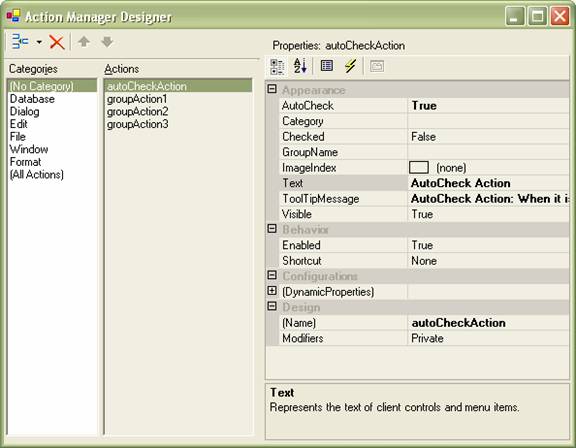
The ActionManager designer allows you to organize, edit, and view your actions by categories.
When using the ActionManager’s pre-built actions, you only need to assign the Action property of your user-interface control to enable its functionality. If you are building your own actions, then define the properties and events with the Designer, and then later associate them with your user-interface control. The following are some of the ready actions that ship with the product.
|
Category |
Operations |
|
Database |
Next, Prior, NextPage, PriorPage, First, Last, Delete, EndEdit, CancelEdit, Add |
|
Edit |
Cut, Copy, Paste, Delete, Undo, SelectAll |
|
Dialogs |
SelectColor, SelectFont, Open, Save, PrintSetup |
|
Format |
Bold, Italic, Underline, Strikeout, Bullets, AlignLeft, AlignCenter, AlignRight |
|
Window |
TileVertical, TileHorizontal, Cascade, ArrangeIcons, MinimizeAll |
The following properties are defined for each action.
|
Action
Property |
Functionality |
|
AutoCheck |
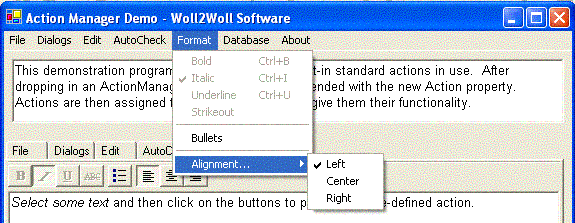
When an action's AutoCheck property set to true, all components associated with the action will have their Checked property stay in sync when one component's Checked property is updated. This is particularly useful and more common when you have a MenuItem from a menu, and a checkbox attached to the same action. The beauty is that you do not have to write any code to update their checked state. Also note that AutoCheck works for grouping buttons or MenuItems, allowing you a convenient way to have one component uncheck/unselect itself when another component having the same GroupName is checked or selected (such as a groupbox). See the screenshot at the top of this document and note the Alignment submenu is automatically controlled by the ActionManager to toggle all related menuitems. |
|
Checked |
Set the Checked property to check or uncheck user-interface components associated with this action |
|
Enabled |
Set the Enabled property to enable or disable components associated with this action |
|
GroupName |
This property works in conjunction with the AutoCheck property allowing the end-user to select from a collection of related components. Set AutoCheck to true when enabling a selectable group. See also the AutoCheck property. |
|
ImageIndex |
Assign an ImageIndex to associate an image from the ActionManager's ImageList to the associated component |
|
Shortcut |
Assign the Shortcut property to associate a keystroke with the action |
|
Text |
Assign the Text property to set the text of components associated with the action. |
|
ToolTipMessage |
Assign a ToolTipMessage to associate a ToolTip for components associated with the action |
|
Visible |
Set the Visible property to show or hide components associated with this action |
System Requirements
The ActionManager supports development through WinForms using either Visual Studio 2003 or Delphi
2005. Note: Delphi 2005 supports actions
through VCL forms, but not through WinForms.
Pricing
Woll2Woll is offering ActionManager at an introductory price of $149 for the standard version, and $249 for the professional version (which includes source).
For a limited time, current Woll2Woll customers can obtain ActionManager for a significantly reduced price of $99 for the standard, and $199 for the professional version.
See http://www.woll2woll.com/Ordering.html
for further details on ordering ActionManager, and special upgrade pricing.